
Recent Posts
AI Engineering
The Limits of a Single Prompt: Why Reasoning Doesn't Guarantee Precision
The more a model "thinks" before answering, the better the answer—a common assumption. We tested it empirically.
AI Engineering
Code Execution: What It Solves and What It Doesn't
A single prompt fails because the model generates answers token by token without verification. What if we give it a Python interpreter?
AI Agents
The Agentic Loop: Verification and Correction as the Foundation of Reliability
Code execution solves mechanical tasks perfectly, but fails when the model needs to evaluate its own output. Enter the agentic loop.
The more a model "thinks" before answering, the higher the chance the answer will be correct—an assumption that is easy to accept uncritically. We tested it empirically on three tasks requiring mechanical, verifiable precision, and the result is more complex than it might seem.
What is a Single Prompt?
A single prompt is the simplest possible way to use a language model, exactly the one most of us know from everyday conversations with ChatGPT: we write a question or command, the model generates one answer, and that's it. The model has no way to check if what it just wrote is correct, it doesn't use a calculator, it doesn't run any code, or consult with itself. It just predicts the next word, then the next, until it finishes the sentence, and whatever comes out goes to us as a ready answer.
This approach works great in conversations, writing texts, or summaries where there is no single "hard" correct answer. The question we asked ourselves was: what happens when a task has exactly one correct answer and requires mechanical precision, like the result of multiplication or the exact number of characters in a text? Does the mere fact that we tell the model to "think longer" (increase the reasoning_effort) guarantee such precision?
The tests were run via Azure OpenAI, on a GPT-5.6 family model. The reasoning_effort parameter controls how many "thinking" tokens the model consumes before generating an answer, from none to xhigh. To distinguish systemic problems from sampling noise, we repeated each task × effort combination four times.
Three Tasks, One Common Feature
We chose three tasks with results that are either strictly correct or incorrect:
- Multiplication — product of two 4-digit numbers, exact result.
- Characters — a text with exactly a specified number of characters (not words).
- Letters — counting the occurrences of a specific letter in a random, ~350-character text.
Results: Efficiency Grows with Effort, But Not Linearly
| Task | none | low | medium | high | xhigh |
|---|---|---|---|---|---|
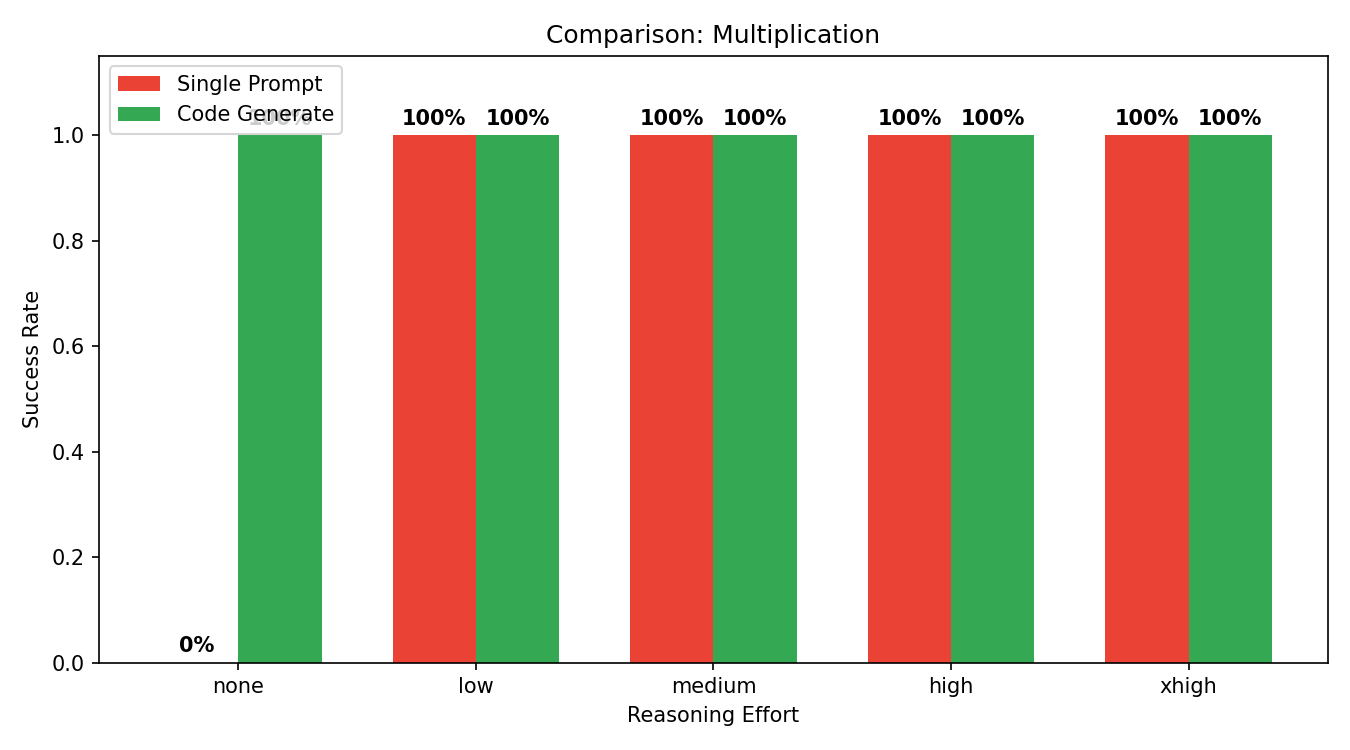
| Multiplication | 0% | 100% | 100% | 100% | 100% |
| Characters | 0% | 0% | 50% | 50% | 100% |
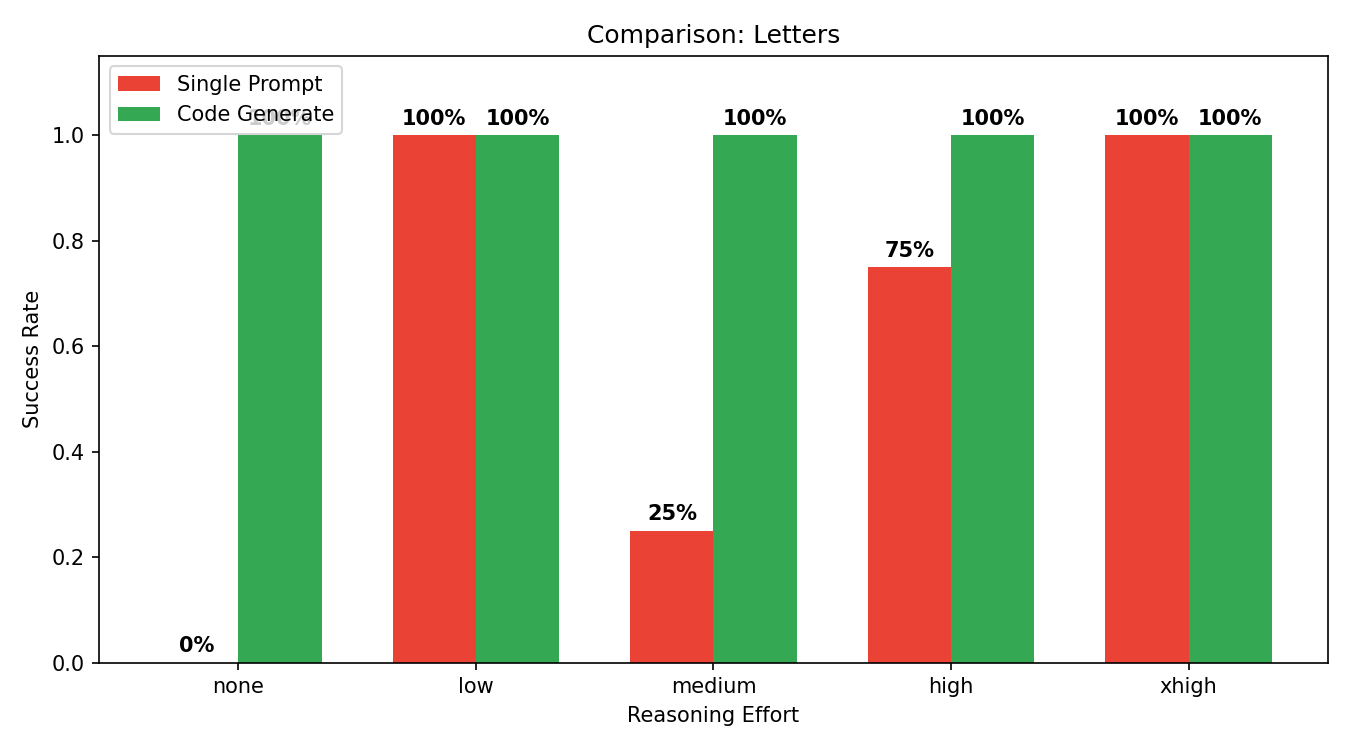
| Letters | 0% | 100% | 100% | 75% | 100% |
At effort=none, all three tasks fail in 100% of the attempts. What's surprising is what happens next. For the Letters task, high effort (75%) performs worse than low and medium (100%), so more reasoning doesn't mean a better result. Higher effort increases the probability of hitting the mark, but doesn't guarantee it.
Why Does This Happen?
At effort=none, the model was supposed to calculate 3471 × 6305 = 21,884,655. It returned: "218637?", a number that was not only wrong but structurally incomplete. This illustrates the mechanics: the model generates an answer token by token, one way, without verifying its own output. There is no "check if this adds up" step. Reasoning effort gives the model more "space" to break down the problem before answering, but it doesn't change the fundamental architecture: it's still one-way generation without a feedback loop.
Cost Grows Faster Than Certainty
Higher reasoning effort means higher costs—we pay for the "thinking" tokens, not just the answer.
| Task | none | low | medium | high | xhigh |
|---|---|---|---|---|---|
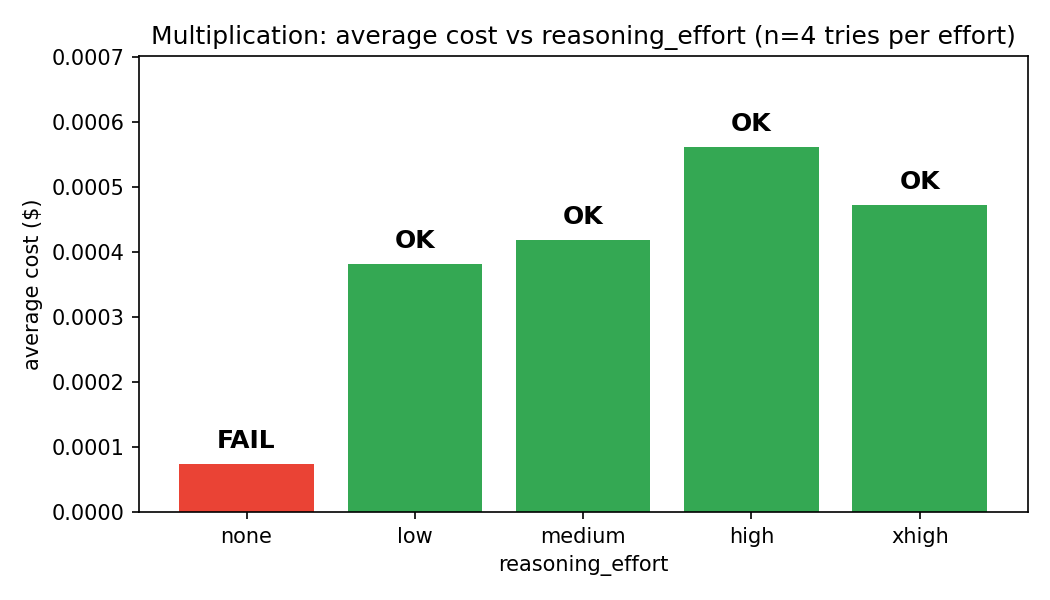
| Multiplication | $0.000075 | $0.000382 | $0.000425 | $0.000584 | $0.000473 |
| Characters | $0.000342 | $0.010084 | $0.010458 | $0.014829 | $0.014225 |
| Letters | $0.000249 | $0.003133 | $0.004803 | $0.005837 | $0.006423 |
For the Characters task, the cost grows from $0.0003 (none) to $0.0148 (xhigh) — almost 40 times more. The efficiency at xhigh actually reaches 100%, but at high it's only 50%. We pay more, not always buying more certainty.

What's Next
Since the problem lies in the lack of verification, the natural step is to give the model a tool that verifies for it. In the next post, we check what code execution gives and where it still falls short.
In the previous post, we showed that a single prompt fails because the model generates answers token by token without verifying what it just wrote. The natural step is to give it a tool that will perform this verification for it: a Python interpreter. The model writes a script, we run it, and whatever the script prints to stdout, we treat as the answer. This is the first of two agentic variants in our series.
What is Code Execution?
Imagine that instead of asking someone to multiply two large numbers in their head, we give them a calculator. This is exactly what code execution does. Instead of asking the model for a direct answer, we ask it to write a short program in Python that will calculate this answer, and then we run this program ourselves.
The difference from a single prompt is fundamental. The model stops "calculating" or "spelling" in its head, and delegates this work to the Python interpreter—a tool that, unlike the model, never makes mistakes in simple arithmetic or character counting. The model focuses on what it's good at: understanding the task and writing the appropriate code, leaving the mechanical execution to a machine designed precisely for that.
We tested this on the same pool of tasks as before: Multiplication, Characters, and Letters, across five levels of reasoning effort, with each configuration repeated four times.
Results: Two Tasks Solved, One Still Fails
| Task | none | low | medium | high | xhigh |
|---|---|---|---|---|---|
| Multiplication | 100% | 100% | 100% | 100% | 100% |
| Letters | 75% | 100% | 100% | 100% | 100% |
| Characters | 0% | 25% | 0% | 25% | 75% |
For multiplication, efficiency immediately rises to 100% even at effort=none. The model no longer needs to calculate in its head; it just generates print(6305 * 3471), and the interpreter performs the multiplication for it. This is exactly the class of problems that code execution fully solves: tasks where mechanical execution replaces the model's "thinking". Letters also quickly reach 100%, although without reasoning (75%) the model still sometimes makes mistakes in the counting logic itself.
Characters is a completely different case because code execution does not solve this problem. The model still has to evaluate the length of the text it wrote itself, and it still gets it wrong. The only difference is that now it does this via an assertion, which simply crashes the script instead of giving a wrong answer.
When an Agent's Own Test Turns Against It
At effort=none, the model was tasked with writing a paragraph about programming, exactly 320 characters long. It wrote code that checks itself:
text = ("Programming turns ideas into instructions that computers can "
"execute. It rewards curiosity, patience, and precise thinking, while "
"offering creative ways to solve problems...")
assert len(text) == 320
print(text)
The text written by the model didn't actually have 320 characters, so the assertion threw an exception, the script crashed, and stdout was empty. This is the best example of the limits of this approach. The model not only misjudged the character count, but it wrote a test that detected it, and despite that, it left the crashing code instead of fixing the text. It had no mechanism to do so; it got one chance and lost it.
Cost: The Tool Isn't Always Cheaper
For Multiplication, the costs are similar to the single prompt, and at effort=none even slightly lower. A short code is cheaper than a long textual calculation. However, for Characters, it's the opposite—code execution is clearly more expensive than a regular prompt at the same effort, and yet it doesn't guarantee success.


What's Next
Code execution solves mechanical tasks 100%, but where the model has to evaluate the quality of its own output, one chance at a script is not enough. It lacks a mechanism that will inform the model that it made a mistake and give it a chance to improve. In the next and final post of the series, we close this loop.
In the previous post, we showed that giving the model a Python interpreter solves mechanical tasks 100%, but it doesn't help where the model has to evaluate the quality of its own output. The agent got one chance at a script, and when its assertion failed, it simply ended up with an empty answer. It lacked a mechanism to pass back the error information and give it another chance.
What is an Agentic Loop?
Imagine a student who turns in homework, gets it back with a marked mistake, corrects it, and turns it in again, until the task is done right. This is exactly how the agentic loop works. In the previous variant (code execution), the model wrote a script and got only one chance; if the code failed, the agent finished with an empty answer and no feedback. In the agentic loop, we add the missing element: information about the error that returns to the model, and the ability to try again.
In practice, it looks like this: the model writes a script, we run it, and if the result is wrong or the script throws an error, we pass exactly what went wrong back to the model—the error message and the expected vs. received output—as the next message in the same conversation. The model sees its mistake and can write a corrected version of the code. The cycle:
write → run → check → correct
repeats until the task is completed correctly or the limit of attempts runs out. In our case, it is set to five turns. This feedback plus the chance to correct is what distinguishes the agentic loop from simple code execution, making a huge difference in reliability.
Three Approaches, One Chart
We tested this on the Characters task, which performed the weakest in both previous approaches.
| Effort | Single Prompt | Code Execution | Agentic Loop |
|---|---|---|---|
| none | 0% | 0% | 50% |
| low | 0% | 25% | 100% |
| medium | 50% | 0% | 100% |
| high | 50% | 25% | 100% |
| xhigh | 100% | 75% | 100% |
From low effort upwards, the agentic loop gives 100% efficiency—exactly where single prompt and one-time code execution failed the most. Verification combined with correction proved more effective than just increasing reasoning effort: even at the cheapest, lowest level of reasoning (low), the loop closes the task in 100% of cases, while the single prompt at the same effort can't handle it at all.
It's worth noting effort=none: there the loop gives only 50% efficiency. Feedback alone doesn't help if the model doesn't have enough "computing power" to meaningfully use the error information in the next turn. The agentic loop is not a universal solution in itself; it needs a minimal level of reasoning for the feedback to make any sense.
How Much Does It Cost in Practice?
More turns mean more model calls, hence a higher cost, but a higher effort shortens the loop. The model better utilizes feedback from the previous attempt, requiring fewer turns for success.
| Effort | none | low | medium | high | xhigh |
|---|---|---|---|---|---|
| Average Turns | 3.50 | 2.50 | 1.75 | 1.75 | 1.50 |
The agentic loop is the most expensive at every effort level, which makes sense. We pay for multiple turns instead of one. However, looking at the efficiency table, the full picture emerges. Single prompt and Code execution "save" on costs, but buy a risk of failure reaching up to 100% at low efforts. The agentic loop pays more from low upwards, but buys certainty. For tasks where a wrong answer actually costs money—because it goes directly to the client, for instance—a difference of a few cents per attempt is a small price to pay for a guarantee of correctness.
Summary of the Entire Experiment
A single prompt generates an answer without verification, so even high reasoning effort doesn't guarantee precision. Code execution introduces an objective "judge" in the form of an interpreter, but without feedback, the agent gets only one chance. Only the combination of these two elements—verification and correction in a loop—provides real reliability. This approach isn't limited to three test tasks; wherever the correctness of a result can be automatically checked (tests, format validation, schema compliance), this same pattern: execute, verify, correct, should work just as effectively.